Built for law firms in all 50 states & federal practice

Your Firm's Entire Practice-Area Library, Built in a Day

Automatically

Tell WebWriter.ai your practice areas and jurisdictions. It plans every practice-area page, state guide and FAQ your site is missing, writes each one the way a partner explains the law to a client, cites the statutes, adds images and infographics, scores it, and pushes it to WordPress — before your next hearing.

3 articles & 10 images free every month · no credit card · cancel anytime

Statutes & case law cited correctly Bar-rule-safe: no guarantees, no "best lawyer" State-specific — no generic "laws vary"
Hartman & Reyes Law (demo)Phoenix, AZ · Family Law, Criminal Defense & Personal Injury · 40-page plan
Browser closed · still running Running
24 of 40 pages generated Starting…
PageTypeStatusScoreWords
How Long Does a Divorce Take in Arizona?how long does a divorce take in arizona
First-Offense DUI in Arizona: Penalties Explainedfirst offense dui arizona
How Is Child Custody Decided in Arizona?arizona child custody laws
Car Accident Lawyer in Scottsdalecar accident lawyer scottsdale
What Is the Statute of Limitations for Injury Claims in AZ?arizona statute of limitations personal injury
Spousal Maintenance in Arizona: Who Qualifies?spousal maintenance arizona
Every page: business bio & credentials woven in · E-E-A-T, YMYL & keyword scoring · ready for your review

* Simplified example of the dashboard shown.

Sound Familiar?

Why Law Firms Fall Behind Online

Legal content is the hardest content to outsource

Writers who don't know the law hedge everything or get it wrong; associates who do know it bill $300 an hour. The practice-area pages stay thin for another year.

Google and AI engines reward authority you aren't showing

Legal pages are "Your Money or Your Life" content. Without cited statutes, attorney credentials and careful language they don't rank — and ChatGPT and Google's AI answers quote the firm that does it properly.

Every state, every county, every practice area

A firm with four practice areas in three states needs dozens of pages to compete locally. Nobody is writing them.

How It Works

From Topic Idea to Published Article in Minutes!

Describe your business once. Everything after that is automatic.

1

Describe Your Business

Your services, locations, credentials and the way you talk to customers. Paste a few paragraphs you've written and it learns your voice.

2

Approve the Plan

Every page your site is missing — service pages, guides, city pages, FAQs — proposed in about 30 seconds and checked against your live sitemap. Tick what you want.

3

It Researches, Writes & Scores

Live search research for each topic, an article written to the Law Firms rulebook, images and an infographic placed in, then scored for keywords, E-E-A-T, YMYL and AI readiness.

4

Review, Publish & Track

Edit in the built-in editor then push to WordPress with one click. Google rank is checked every two weeks, with refresh alerts when a page slips.

The Law Firms Rulebook

Written the Way Your Industry Actually Talks

Generic AI writes generic words. WebWriter.ai writes every page under a rulebook built for law Firms — the vocabulary, the compliance lines and the credibility signals Google and your customers expect.

  • Attorney voice: "our firm has handled…", "in our experience…" — first-hand, never generic
  • Statutes, codes and case law cited inline and correctly for the state in question; federal where it applies
  • Bar-rule-safe language: no outcome guarantees, no "best" or "top" claims, required disclaimers included
  • Attorney credentials (JD, bar admissions, certifications, awards) woven in where they build trust
  • Links to your Avvo, Justia, Martindale, Super Lawyers and Google Business profiles as authority signals
  • State and city pages built from real local law and procedure — not a city name swapped into a template
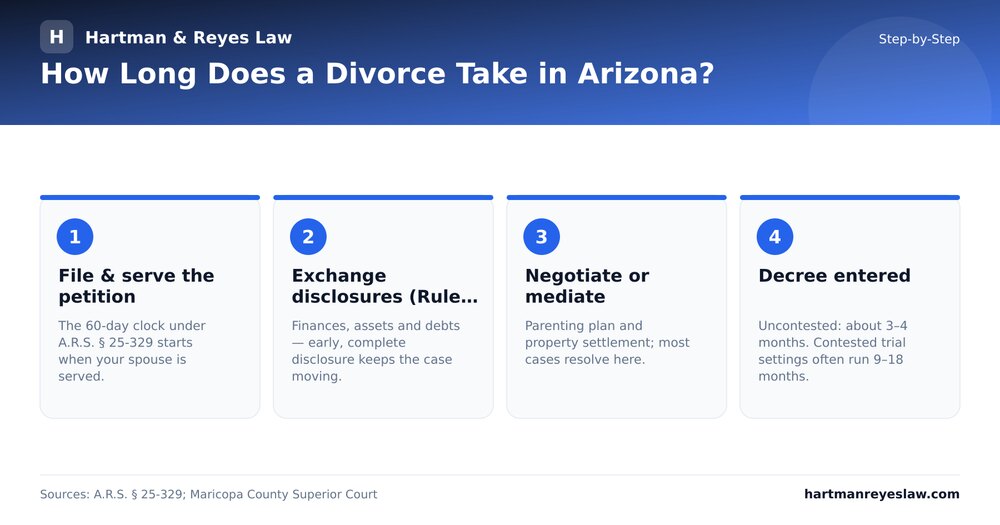
Step-by-Step infographic built from an Arizona divorce-timeline article
Step-by-Step infographic built from an Arizona divorce-timeline article — generated automatically, every word from the article
Attorneys meeting with a client
AI images placed under the right headings, pushed to WordPress with the article
Everything Included

A Complete Content Engine, Not Just a Writer

Bulk Content Planner

Describe your business, approve a 40-page plan, walk away. Pages generate in the background and finish while you work.

WebWriter Analysis

Live search research for every topic: the ranking pages, the terms they use, the questions people ask. No SEO subscription needed.

Images & Infographics

A featured image, in-article photos under the right headings and a branded infographic built from the article's own facts.

Rank Tracking & Refresh Alerts

Published pages are checked in Google every two weeks; you're told when one slips and can refresh it in one click.

WordPress, Word & PDF

Push articles and images straight to WordPress as draft or published, or export to Word, PDF and HTML.

Your Voice, Your Instructions

Paste your writing and it learns your voice; add standing instructions ("always mention same-day appointments") and every page follows them.

Simple Pricing

Start Free. Upgrade When It Pays for Itself.

Every plan includes the full engine — industry rulebooks, search analysis, images, infographics, rank tracking and WordPress publishing.

Free
$0/mo
  • 3 articles every month
  • 10 AI images & infographics
  • 1 business profile · 1 seat
  • Up to 1,500 words per article
  • No credit card required
Start Free
Professional
$399/mo
  • 30 articles every month
  • 250 AI images & infographics
  • 10 business profiles · 3 seats
  • Up to 3,000 words per article
  • WordPress, rank tracking, bulk planner
Get Started
Enterprise / Agency
$999/mo
  • 100 articles every month
  • 1,000 AI images & infographics
  • 50 business profiles · 10 seats
  • Up to 3,000 words per article
  • WordPress, rank tracking, bulk planner
Get Started

Need more in a busy month? Content Packs: 5 articles + 20 images for $99, or 15 articles + 60 images for $269.

Questions Law Firms Ask Us

Is the legal content accurate and current?

The engine researches the top-ranking pages for each topic, cites the governing statutes and case law for the state you select, and scores every article for E-E-A-T and YMYL compliance. Attorneys review and edit before publishing — it's built to make that review fast, not to replace it.

Does it comply with bar advertising rules?

The legal rulebook blocks outcome guarantees and superlatives ("best lawyer"), includes the required disclaimers, and keeps the attorney-client language correct. You remain responsible for your jurisdiction's rules, and you can add standing instructions for any firm-specific requirements.

Can it write for multiple states?

Yes — every article targets the state(s) you choose, with that state's statutes and procedure. Nationwide topics use federal law.

We came from JurisContent — what's different?

WebWriter.ai is the next generation of the same engine: the identical legal prompts and validation, plus bulk planning, our own search analysis, rank tracking and refresh alerts, automatic images and infographics, team seats, white-label client approvals and a Free plan.

What does it cost?

Free: 3 articles and 10 images a month, no card. Starter $199/month for 10 articles; Professional $399 for 30; Enterprise / Agency $999 for 100. Content Packs add more any time.

Your Firm's Entire Practice-Area Library, Built in a Day.

Your first 3 articles and 10 images are on us — this month and every month.

Get Started For Free!

No credit card · cancel anytime · your content is always yours